Automate a DOCX with Node.js
Query a DOCX, accept its tracked changes, and save the result from Node.js.
Use the SDK when application code knows the operation it needs. No model is involved: the script queries, mutates, and saves deterministically.
1. Install the Node.js SDK
pnpm add @superdoc/sdk@latestThe SDK embeds the SuperDoc runtime. You do not need a separate CLI installation to use SuperDocClient.
2. Prepare a document
Download the tracked-changes fixture. Save it as contract.docx in your working directory. It contains the word termination and one tracked change. Any document meeting those two conditions also works.
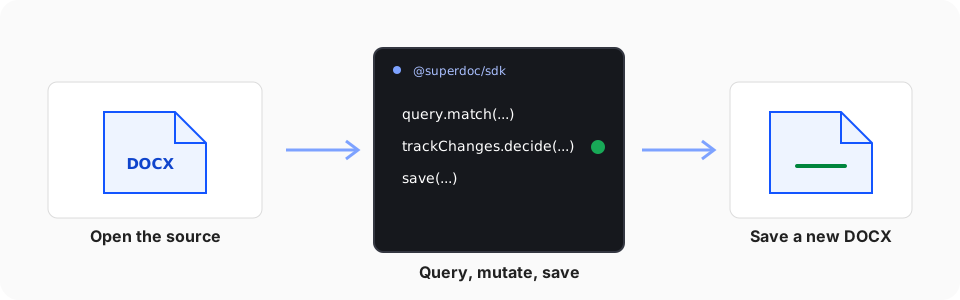
3. Query, mutate, and save
Create accept-changes.mjs:
import { SuperDocClient } from '@superdoc/sdk';

/** @param {unknown} value */
function isSuccessfulReceipt(value) {
  return typeof value === 'object' && value !== null && 'success' in value && value.success === true;
}

const client = new SuperDocClient();

try {
  await client.connect();
  const doc = await client.open({ doc: './contract.docx' });

  try {
    const match = await doc.query.match({
      select: { type: 'text', pattern: 'termination' },
      require: 'first',
    });

    console.log('Matched:', match.items[0]);

    const receipt = await doc.trackChanges.decide({
      decision: 'accept',
      target: { kind: 'all' },
    });

    console.log('Mutation receipt:', receipt);
    if (!isSuccessfulReceipt(receipt)) throw new Error('Accepting tracked changes failed.');

    await doc.save({
      out: './contract.accepted.docx',
      force: true,
    });
  } finally {
    await doc.close({ discard: true });
  }
} finally {
  await client.dispose();
}
Run it with Node.js:
node accept-changes.mjs4. Verify the output
Open contract.accepted.docx in Word or the SuperDoc editor. The tracked changes should be accepted. The original contract.docx remains unchanged.
Saving to a separate path leaves the source session dirty by design. After the output succeeds, close({ discard: true }) closes that in-memory session without overwriting the source file.
For the contract behind each step, read the Document API mental model.
Reuse one client across many operations
One SuperDocClient owns one SuperDoc host process. connect() starts that process once. Every open() adds a document session inside the same process, and every method on a document handle is one request to it. The SDK never starts a process per operation.
A client created per operation pays the whole cold path every time: process start, engine load, and for a collaboration document the room connect and initial sync. That cost is the same for a read, a search, or a comment, so it dominates any workflow that issues many small operations. Hoist the client and the open out of the per-operation path:
import { createSuperDocClient } from '@superdoc/sdk';

// Once per service, or once per collaboration room you serve.
const client = createSuperDocClient({ user: { name: 'AI Assistant', email: '[email protected]' } });
await client.connect();
const document = await client.open({
  doc: 'contract-123',
  collaboration: { providerType: 'hocuspocus', url: 'wss://collaboration.example.com', documentId: 'contract-123' },
});

// Many times per agent turn. Each call reuses the open session.
const info = await document.info();
const matches = await document.query.match({ select: { type: 'text', pattern: 'termination' }, require: 'all' });

// When the room or the service shuts down.
await document.close();
await client.dispose();
What that lifetime means in practice:
- A handle is a session. Open a document once and keep the handle for as long as the workflow needs it. One client can hold several open documents; each handle is its own session.
- One host runs one request at a time. Operations on the same client queue. For parallel throughput across documents, run a small pool of clients and lease one per in-flight workflow. A client's
requestTimeoutMsis fixed when its host starts; individual calls can still pass their owntimeoutMs. - Restart is automatic, sessions are not. If the host process exits, the next request starts a new one and every previously open handle is gone; reopen the document. Unsaved changes do not survive that: the session rehydrates from its on-disk context and loses whatever the last autosave had not yet written. Save at a point you choose.
- Refs expire, node ids do not. A
query.matchref is bound to the revision that produced it and stops resolving after any mutation. BlocknodeIdvalues stay stable across edits, so target follow-up work with{ kind: 'block', nodeType, nodeId }and re-runquery.matchonly when you need a text range.
Typical cost of each lifecycle for a 53-operation agent turn on a mid-sized document:
| Lifecycle | Median per call | Whole turn |
|---|---|---|
| New client per operation | ~460 ms | ~24 s |
| One client, open and close per operation | ~140 ms | ~8 s |
| One client, one open document | ~40 ms | ~3 s |
Batch many operations into one request
Two document-level batches collapse several operations into one request:
document.mutations.apply(plan)commits several text or formatting steps as one atomic transaction. Selector targets re-resolve before each step, so you do not re-search between them. See Mutation plans.document.plan.execute({ entries })runs a list of arbitrary operations in one request. Each entry is its own transaction, so a failure partway through keeps the earlier entries committed. Later entries can reference earlier results throughcaptureAsandcapture-refmarkers.
For example, anchor a batch of comments in a single request instead of one request per comment:
const result = await document.plan.execute({
  entries: reviewNotes.map(({ quote, note }) => ({
    operationId: 'comments.create',
    input: { target: { text: quote }, text: note },
  })),
});

// plan.execute reports a failed entry in `failure` rather than throwing. An
// ignored result is an ignored batch: it stops at the first hard failure, so
// later entries never ran.
if (result.failure) {
  const { entryIndex, operationId, message } = result.failure;
  throw new Error(`comment batch stopped at entry ${entryIndex} (${operationId}): ${message}`);
}Open a token-authenticated collaboration document
Pass a Hocuspocus or y-websocket token in the options for that document's open request:
const document = await client.open(
  {
    doc: './contract.docx',
    collaboration: {
      providerType: 'hocuspocus',
      url: 'wss://collaboration.example.com',
      documentId: 'contract-123',
    },
  },
  { collaborationAuth: { type: 'token', token: userToken } },
);
The credential is separate from the collaboration profile and command-line arguments. It applies to the provider created for this open request. Per-open token authentication is not supported for Liveblocks.
To initialize a new room from a DOCX, set roomMode: 'create' for one worker. Later SDK sessions and editors use roomMode: 'join'. If multiple backend workers can start the same document, coordinate room creation in your backend and collaboration server before calling create.
Close a Liveblocks collaboration session
In a Liveblocks room, close() waits until Liveblocks confirms it has every change from the session, then leaves
the room. You can close right after your last edit; you don't need a delay or a poll of the room first.
The wait ends at the collaboration profile's syncTimeoutMs (30 seconds by default) or shortly before the close
request's own timeout, whichever comes first. If Liveblocks has not confirmed by then, the session is still released
and close() throws COLLABORATION_SYNC_TIMEOUT. Treat that as
"the room may be missing edits from this session":
import { SuperDocCliError } from '@superdoc/sdk';

try {
  await document.close({ discard: true });
} catch (error) {
  if (error instanceof SuperDocCliError && error.code === 'COLLABORATION_SYNC_TIMEOUT') {
    // Reopen the room with roomMode: 'join' and check or reapply the session's edits.
  }
  throw error;
}
To run an agent next to people editing in the browser, follow Add an agent in the collaboration server guide.
Record who changed what
A Node.js backend can join a room as an observer and copy attributed change records into its own store with await doc.changes.list({ after, waitMs: 30000, includeUpdate: true }). See Record who changed what.
Prefer Python? Follow the Python SDK guide for the same deterministic workflow. For Rust, follow the Rust SDK guide.